Pack / Item A
Pack / Item B
ManuallyInstallOn smart Phone
Smart Grocery Shopping Globally: How to Use a Unit Price Calculator to Save Money
Navigating the grocery aisles can be confusing due to deceptive packaging tactics. Whether you are shopping online via quick-commerce apps like Blinkit, Zepto, and BigBasket, or browsing the physical shelves at global retail giants like Walmart, Costco, Target, D-Mart, and Reliance Smart, brands often use clever marketing tricks to hide price hikes. This widespread strategy, known as shrinkflation, involves reducing the product quantity inside the box while keeping the price and packaging size exactly the same.
Why Bigger Packs Aren't Always Cheaper
Most everyday shoppers assume that buying bulk, club sizes, or family-sized packs automatically guarantees a wholesale discount. However, running a quick calculation frequently reveals the exact opposite. For instance, a standard 250g pack of tea leaves or paneer at your local Kirana store might actually cost less per gram than a 1kg mega pack from a major brand. Similarly, a small box of cereal at Target or Walmart can beat the unit rate of a massive wholesale warehouse bundle. Without calculating the exact unit cost, it is nearly impossible to spot these pricing anomalies.
How Our Price Comparison Tool Works
Our free online Smart Price Compare utility eliminates the guesswork from your monthly budgeting. By calculating the cost per unit (such as price per gram, milliliter, ounce, or individual item), this tool helps you uncover true value across different sizes and competing brands. Here is how to use it during your next shopping trip:
- Step 1: Enter the price and the weight/volume of Pack A (e.g., $5.99 / ₹150 for 400g or ounces of product).
- Step 2: Enter the price and weight/volume of Pack B (e.g., $8.50 / ₹220 for 650g or ounces of competing product).
- Step 3: Review the automatically generated unit price to see exactly which option offers the best value.
By running a quick mathematical check before checking out your cart, you can protect your monthly household budget from hidden retail markups. Bookmark this simple, responsive utility tool on your smartphone home screen to ensure you always secure the absolute best deals in the retail market, no matter where you shop across the globe.
Why Savvy Shoppers Use This Unit Price Calculator
It is easy to assume that price comparison takes too much time, or that a few cents or rupees saved here and there do not matter. However, in today's grocery market, smart consumers realize that a few seconds spent checking the numbers can lead to massive monthly savings. Here is why this tool is an essential companion for modern grocery shopping:
1. Exposing the Quick-Commerce & Retail Trap
On instant delivery apps like Blinkit, Zepto, and BigBasket, or big store displays at Walmart and Target, products are thrown at you with flashy labels like "Super Saver Pack," "Family Pack," or "Value Value Pack". Brands count on the fact that you are in a rush. By spending just 5 seconds dropping the price and weight into our calculator, you can instantly see if that "saver pack" is actually charging you more per unit than the standard individual box.
2. Beating Hidden Shrinkflation Globally
Companies rarely raise the retail price of your favorite soap, tea powder, cereal, or biscuit brand directly because it panics consumers. Instead, they use a deceptive tactic called shrinkflation—keeping the price exactly the same while quietly shrinking the pack size. Because your eyes only look at the price tag, you get less product for the same money. This tool calculates the exact cost per 100g or 100ml, stripping away the packaging tricks so you only pay for what you actually get.
3. Real Savings for Bulk and Monthly Ration Buyers
If you do your monthly grocery shopping at offline mega-marts like Costco, D-Mart, or Reliance Smart, you are buying 30 to 40 items at once. Saving a few pennies or rupees on a few items—like premium laundry detergents, cooking oils, and staple grains—adds up quickly. Over a full year, spending a few moments to verify values with this tool can easily shave thousands off your global household expenses.
4. No Math, No Friction
You do not need to pull out your phone's default calculator app and try to remember cross-multiplication formulas while standing in a busy supermarket aisle. This web tool handles the math instantly. It requires no user login, tracks no personal data, loads instantly on slow store networks, and gives you a definitive answer in two taps.
How to Add as App in Home Screen For Easy Access in Android Phone
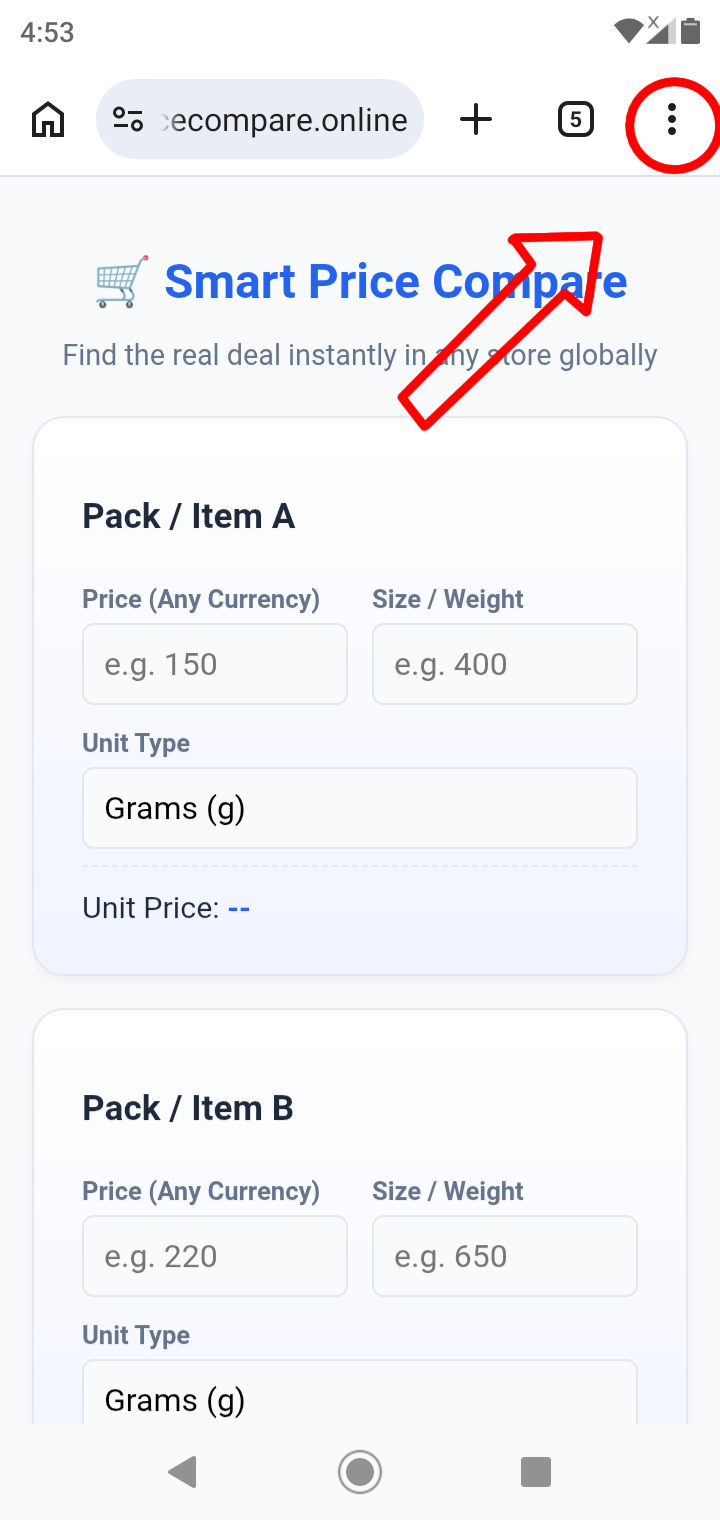
Click on the three dots on top right Corner in your Chrome Browser
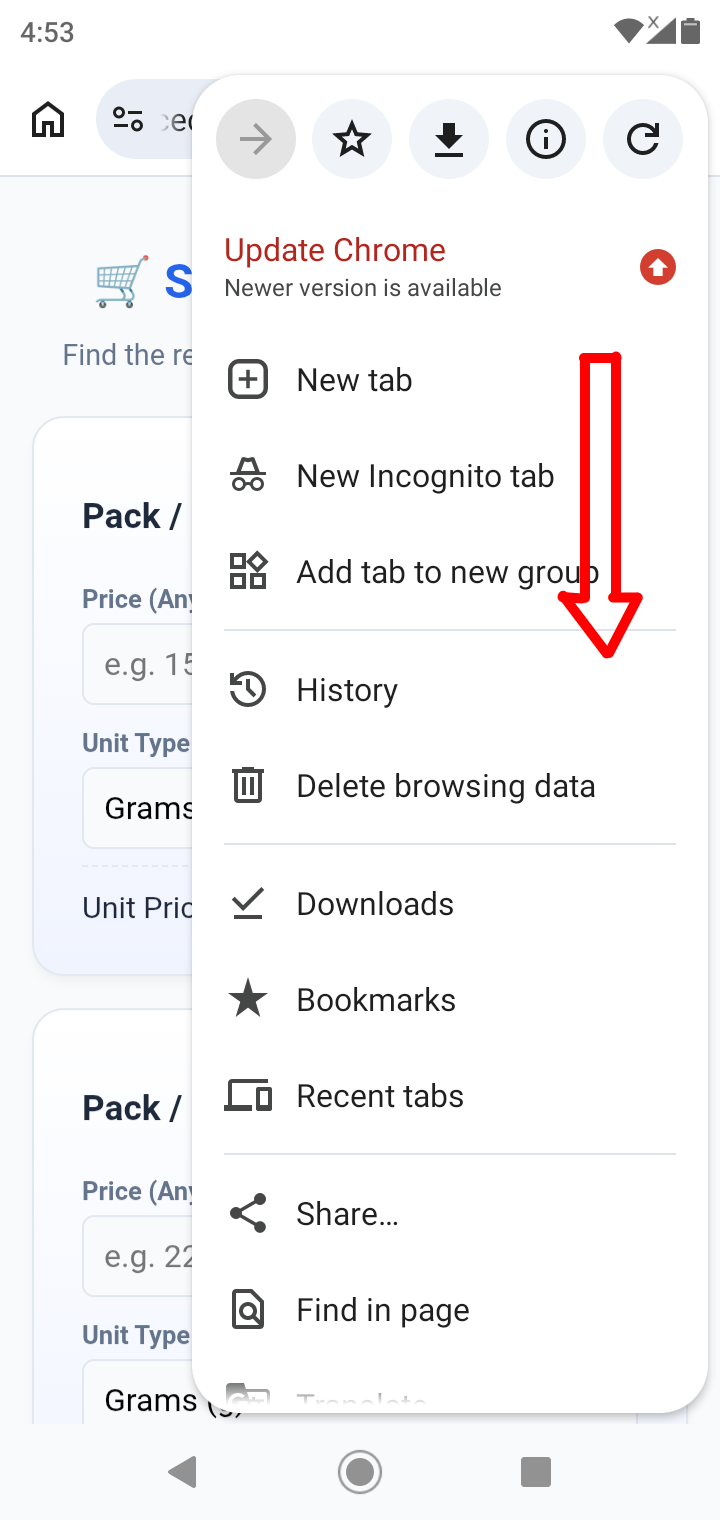
Scroll Down to Go Bottom
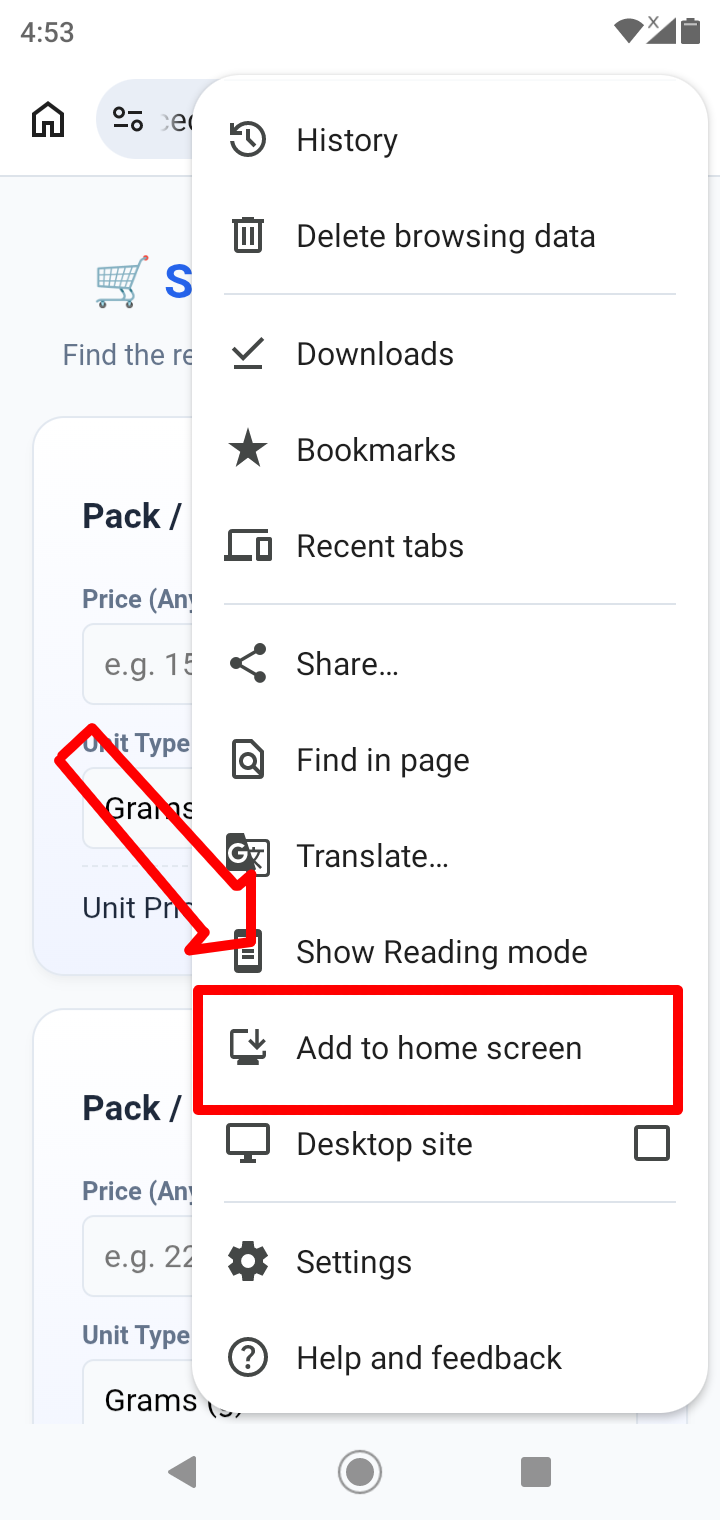
Click on the "Add to Home Screen" option which is third from bottom to add WebApp to Your Home Screen
Thats all,you successfully installed WebApp in your device